Honeycomb Pages Plugin
The Honeycomb Pages Plugin automatically sends traces to Honeycomb for analysis and observability.
Installation
Usage
The following usage example uses environment variables you will need to set in your Pages project settings.
Alternatively, you can hard-code (not advisable for API key) your settings the following way:
This Plugin is based on the @cloudflare/workers-honeycomb-logger and accepts the same
configuration options
.
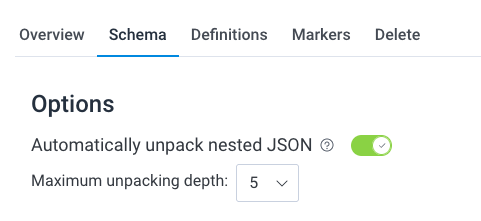
Ensure that you enable the option to Automatically unpack nested JSON and set the Maximum unpacking depth to 5 in your Honeycomb dataset settings.
Additional context
data.honeycomb.tracer has two methods for attaching additional information about a given trace:
data.honeycomb.tracer.logwhich takes a single argument, aString.data.honeycomb.tracer.addDatawhich takes a single argument, an object of arbitrary data.
More information about these methods can be seen on
@cloudflare/workers-honeycomb-logger’s documentation
.
For example, if you wanted to use the addData method to attach user information: